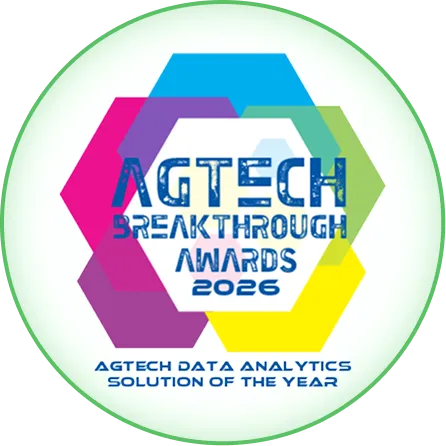
Data Analytics Solution of the Year” 2026 in Agtech Breakthrough Awards 2026


Intelligence, Automation & Support is Phase 4 of the implementation, but it is not really a phase in the same sense as the others. It runs across all the other phases, from the start of Phase 1 through the end of Phase 3 and onwards into the post-go-live steady state. It is the workstream that delivers dashboards, workflow automation, AI capabilities, the underlying cloud and security platform, and the ongoing service desk that supports the business after the operational phases conclude.
This document describes how the Intelligence, Automation & Support workstream operates, what it delivers in each phase, and how it transitions from implementation activity into ongoing partnership.
1. Why Phase 4 runs across all phases
What is built when
| Capability | What it means in practice |
|---|---|
| From day one of Phase 1 | The cloud platform, security, identity, backup, and monitoring infrastructure on which AgriERP runs. The Folio3 service desk is operational from kickoff. Initial automation around finance workflows (approval routing, three-way matching, period close). |
| Through Phase 1 | Finance dashboards built as data starts flowing. Reporting infrastructure provisioned. Initial AI capabilities for finance (Copilot for finance users, basic anomaly detection on financial transactions). |
| Through Phase 2 | Operational dashboards built as field data starts flowing. Mobile-side automation (scheduled work-order generation, exception escalation). Initial AI capabilities for operations (yield anomaly detection, equipment failure prediction). |
| Through Phase 3 | Commercial dashboards built as supply-chain data flows. Heavy workflow automation (three-way match at scale, EDI integrations, settlement runs). Full AI capabilities (Copilot for all roles, forecasting across yield, demand, and cash, predictive insights surfacing across the business). |
| From go-live onwards | The service desk continues. Dashboard and AI capabilities are refined based on real usage patterns. New automation is added as the business identifies opportunities. The implementation transitions to ongoing partnership. |
Why building incrementally matters
- Data has to exist first: dashboards and AI run on data. Operational dashboards built before operational data is flowing have nothing to show. They are built as the data starts flowing, not before.
- Real usage drives refinement: the first version of every dashboard and every automation gets refined based on real usage. Building everything upfront in isolation produces things nobody uses.
- Foundational concerns cannot wait: security, monitoring, backup, and service desk readiness have to be present from day one. The business cannot run financial transactions on an unsecured, unmonitored platform.
- Automation builds on operational data: as Phases 1, 2, and 3 deliver operational data, automation opportunities become visible. The automation backlog grows naturally; the team prioritises what to build next.
2. Dashboards
Dashboards delivered in each phase
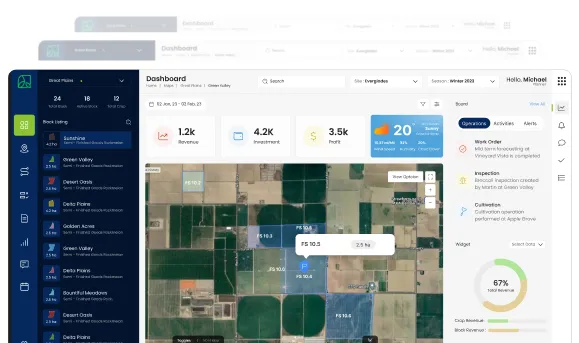
- Phase 1 dashboards: financial dashboards for the CFO and finance team. AR aging. AP aging. Cash position. Trial balance vs. budget. Period-close progress. Generic income statement and balance sheet views. Built as soon as the GL has live data, which is typically week 4 or 5 of Phase 1.
- Phase 2 dashboards: operational dashboards for farm managers, agronomists, and operations leadership. Daily harvest. Block performance. Crop performance. Labor productivity. Equipment utilisation. Built as soon as field data starts flowing, typically late in Phase 2.
- Phase 3 dashboards: commercial dashboards for sales, supply chain, and executive teams. Sales orders, contract fulfilment, dispatch status, quality acceptance, vendor performance, customer profitability. Built as the supply chain digitises, typically in the later weeks of Phase 3.
- Post-go-live dashboards: as the business identifies specific reporting needs that did not appear in the initial implementation, custom dashboards are built. This is part of the ongoing optimisation cycle.
The dashboard development pattern
- Standard library first: Folio3 ships AgriERP with a library of standard dashboards for common roles. These are the starting point; configuration shapes them to the business.
- User co-design: the people who will use the dashboard help design it. Sitting in front of the screen with the future users, refining the widgets and the filters together, is far better than building dashboards in isolation and presenting them later.
- Iterate after first use: no dashboard is final on day one. After a few weeks of real use, what works and what does not become clear. The dashboard is iterated.
- Embedded in workflow: the best dashboards are the ones embedded in the user’s actual workflow, not standalone screens they visit occasionally. Dashboards in the morning standup, in the operations room, in the email inbox.
3. Workflow automation
Automation delivered in each phase
- Phase 1 automation: AP and AR approval routing; three-way matching of POs, receipts, and invoices; period-end accrual generation; depreciation runs; bank reconciliation. The finance workflows automated from the start.
- Phase 2 automation: scheduled work-order generation from crop plans; maintenance work-order triggering from usage thresholds; labor capture-to-payroll flow; exception escalation when work orders or productivity diverge from plan.
- Phase 3 automation: buyer order ingestion and EDI flows; production-order generation from sales orders; dispatch document generation; settlement runs; vendor invoice processing; grower settlement automation (where in scope).
- Post-go-live automation: as the business identifies further automation opportunities (specific recurring tasks, error-prone manual workflows), the automation backlog continues to expand.
How automation is prioritised
- Volume × manual effort: the workflows that take the most manual time get automated first. Daily activities with many transactions outrank quarterly activities with few.
- Error cost: workflows where errors are costly (financial transactions, regulatory submissions, buyer communications) are prioritised for automation, even if the manual effort is moderate.
- Rule clarity: workflows with clear, deterministic rules are easier to automate. Workflows where outcomes depend on judgement are kept human or supported with AI rather than fully automated.
- Compliance benefit: automation that improves compliance posture (audit trails, segregation of duties, statutory submissions) gets priority because of the regulatory value.
- Adoption readiness: automation that requires significant change-management is sequenced when the organisation is ready, not rushed when it is still absorbing the previous changes.
4. AI capabilities
AI delivered in each phase
- Phase 1 AI: Copilot enabled for finance users (ask questions about financial data, get summaries, draft communications). Anomaly detection on financial transactions (unusual journal entries, payment patterns, vendor invoice anomalies). Initial financial forecasting (cash position projection based on historical patterns).
- Phase 2 AI: Copilot rolled out to operations users. Yield forecasting at block level once enough field data is captured. Equipment failure prediction from telematics data. Pest and disease early warning from scouting patterns. Labor productivity insights.
- Phase 3 AI: Copilot for sales and supply chain users. Demand forecasting from order patterns and contract data. Customer churn signals. Quality issue pattern detection. Margin erosion analysis. Working capital optimisation suggestions.
- Post-go-live AI: with the full data picture, AI capabilities deepen. Multi-year yield modelling. Variety performance prediction. Buyer behaviour modelling. Increasingly sophisticated forecasting and insight generation as the historical data accumulates.
Why AI is rolled out incrementally
- AI needs data: AI models trained on insufficient data produce unreliable results. Forecasting that has not seen a full season cannot model seasonality. Predictive insights need enough events to learn from. The AI capabilities grow as the data grows.
- Trust has to be built: users need to see AI being right before they rely on it for important decisions. Starting with simpler, lower-risk capabilities builds the trust that supports the more consequential ones later.
- Validation against ground truth: every AI capability is validated against actual outcomes. Forecasts compared to actuals. Predictions compared to events. Patterns found compared to ground truth. The validation is what justifies expanding AI’s role.
- Avoiding AI theatre: AI features that look impressive in demos but do not actually help the business are avoided. Every AI capability has to earn its place by demonstrably making someone’s job better.
5. Security and the cloud platform
The security and platform workstream
- Cloud environment: the enterprise cloud platform on which AgriERP runs, provisioned in the right regions for data residency and latency, with the right service tiers for scale and reliability.
- Security framework: encryption at rest and in transit, role-based access control, audit logging, threat monitoring, vulnerability management, security baselines aligned to enterprise security frameworks.
- Identity integration: AgriERP authenticates against the business’s enterprise identity provider. Single sign-on, multi-factor authentication, role provisioning, deprovisioning at offboarding.
- Backup and disaster recovery: backup schedules, retention policies, recovery objectives. Disaster-recovery setup including geographic redundancy. Tested recovery procedures.
- Monitoring and alerting: platform monitoring with alerting to Folio3’s service desk and the business’s IT team. Performance, availability, security events, integration health.
- Compliance posture: compliance with the regulatory frameworks the business operates under (data protection law, sector-specific requirements, certification standards). Documented, audited, maintained.
How the platform evolves
- Continuous patching and updates: the platform is kept current with security patches, infrastructure updates, and AgriERP version upgrades. Folio3 manages this on the business’s behalf.
- Scaling with the business: as the business grows, the platform scales with it. Additional capacity, additional regions, additional reliability tiers as needed.
- Periodic security reviews: the security posture is reviewed periodically (typically annually), with penetration testing, vulnerability assessment, and policy review.
- Disaster-recovery testing: disaster recovery is tested at agreed intervals. Untested DR is theoretical DR; the testing is what makes it real.
6. The dedicated service desk
What the service desk provides
| Capability | What it means in practice |
|---|---|
| Incident handling | When something is not working, the business contacts the service desk. The incident is triaged, assigned to the right resolver, and tracked to resolution with the business kept informed. |
| Service requests | Routine requests (new user setup, password reset, configuration changes, report adjustments) handled through the service-desk request system with clear turnaround commitments. |
| Defect resolution | Where defects are identified in the platform or in the business’s specific configuration, they are logged, prioritised, and resolved through patches or releases. |
| Enhancement requests | Where the business wants new capabilities or changes, the request is captured, evaluated for fit with the AgriERP roadmap and the business’s specific situation, and either implemented as part of the standard product, as a configuration change, or as a custom development. |
| Period-close support | Especially in the early months after each phase goes live, the service desk provides direct support during financial close cycles. |
| Account and relationship management | Regular check-ins with the business’s project sponsor and IT lead, covering roadmap, satisfaction, upcoming changes, and any concerns. |
Service-desk operating model
- Same team continuity: many of the service-desk people are the same people who implemented. They know the business’s specific configuration, its peculiarities, and its history. Issue resolution does not lose context.
- Local-hours coverage: service desk coverage during the business’s operating hours, with on-call coverage for critical incidents outside those hours.
- Service levels: incident response times, resolution targets, and uptime commitments documented in a service-level agreement; tracked and reported monthly.
- Multi-channel access: service-desk access via portal, email, phone, and (for ongoing relationships) direct contact with named consultants for routine items.
- Knowledge transfer: the service desk helps the business build internal capability over time. The goal is not perpetual dependency on Folio3 for every question; it is a partnership where the business handles routine matters internally and Folio3 supports the harder things.
Hyper-care and steady-state transition
- Hyper-care immediately after each phase: for two to four weeks after each phase goes live, the service desk operates in hyper-care mode: faster response times, more proactive monitoring, often on-site presence. The immediate post-go-live period is when most issues surface, and rapid response is what prevents them from compounding.
- Transition to steady-state: after the hyper-care period and a stable period of operation, the service desk transitions to steady-state operation. The transition is recognised explicitly, with steering-committee signoff.
- Continuous improvement reviews: the service-desk relationship includes periodic reviews (quarterly is typical) covering performance, opportunities for optimisation, and the roadmap of upcoming changes.
- Annual roadmap reviews: once a year, the business and Folio3 review the AgriERP capability roadmap together. New product capabilities, new business priorities, planned upgrades, and major initiatives are aligned.
Why the service desk matters as much as the implementationAn implementation goes live in months. The business runs on AgriERP for years. The service desk relationship is what bridges the two: the implementation team that built the system stays available, the relationship continues, and the business has a trusted partner to call when something needs attention.Many ERP implementations fail not at go-live but at the year-one mark, when the implementation team has moved on, the customer is left with a system they do not fully understand, and the support is generic and uninformed. Folio3’s dedicated service-desk model addresses this directly. The relationship that supports the system is the same relationship that built it.
In summary
Phase 4, Intelligence, Automation & Support, runs across all the other phases of the implementation and continues into ongoing operation. Dashboards, workflow automation, and AI capabilities are delivered incrementally as the underlying data flows from Phases 1, 2, and 3. The enterprise cloud platform, security framework, identity integration, backup, disaster recovery, and monitoring are built in Phase 1 and maintained throughout. The dedicated service desk operates from day one of the implementation, supports the business through hyper-care immediately after each go-live, and continues as the long-term operating partnership.
With Phase 4 running across all phases and continuing afterwards, AgriERP is not just installed and walked away from. It is a system the business uses for years, with a partner who knows it intimately and supports it actively. That partnership is the difference between an implementation that delivers value once and one that delivers value continuously, year after year.