The ERP Solution for the Year” 2025 in Agtech Breakthrough Awards 2025
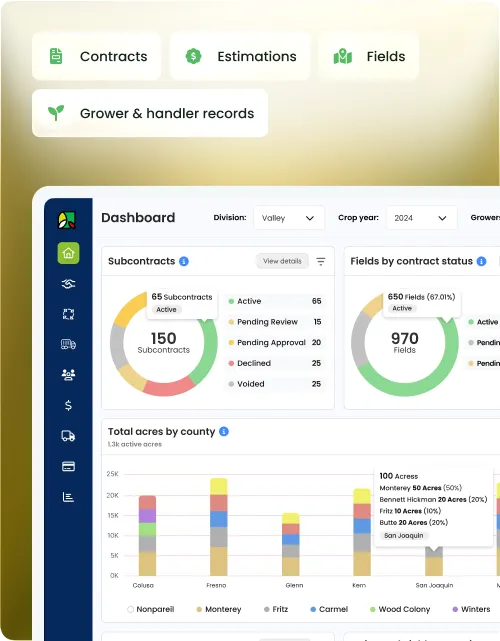
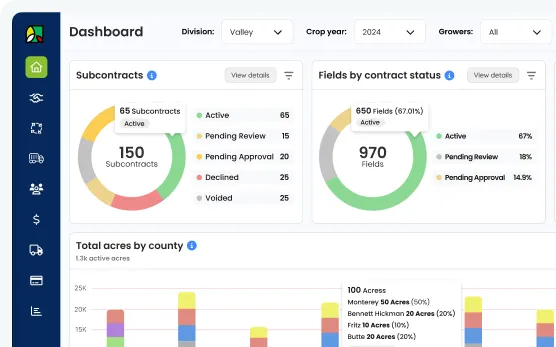
The Growers Portal gives handlers a single system to manage grower pools, contracts, receiving records, payment processing, and payee settlement — all connected to inventory and finance on Microsoft Dynamics 365.
Built on


Most handlers run grower contracts in one system, receiving records in another, and payment calculations in a spreadsheet. When QC adjustments, advances, and multi-payee splits all need to reconcile at settlement, errors are almost guaranteed.
Grower agreements live in email or a standalone tool, receiving manifests in another, and payment calculations in a spreadsheet. Pulling them together at settlement takes days and still produces errors.
Price adjustments for moisture, foreign material, and other quality factors are calculated outside the system and entered manually. Any change to the QC table means recalculating every affected payment.
When a grower contract has multiple payees — a landowner, a farm operator, an estate trust — splitting weight, fees, and adjustments by percentage requires manual work that the system has no record of.
The Growers Portal manages every stage of the grower relationship — pool creation, contract management, receiving visibility, payment processing, and payee settlement — all in one system connected to Microsoft Dynamics 365.
Create a new grower pool for the current crop year or copy an existing pool from a prior year. Copying carries over pool structure, variety pricing, and grower assignments so setup at the start of each season takes minutes, not days.
Set the base price per variety within each pool. Prices defined at the pool level flow automatically to grower contracts created from that pool, ensuring consistency across all contracts in the same pool without manual per-contract entry.
Generate grower contracts for all growers in a pool in a single bulk operation. Each contract inherits the pool pricing and structure, and can be individually adjusted before being issued to the grower.
Link the pool-defined variety price to each grower contract at the contract level. Where a grower has negotiated a different rate, the contract price can be overridden individually without affecting the pool or other contracts.
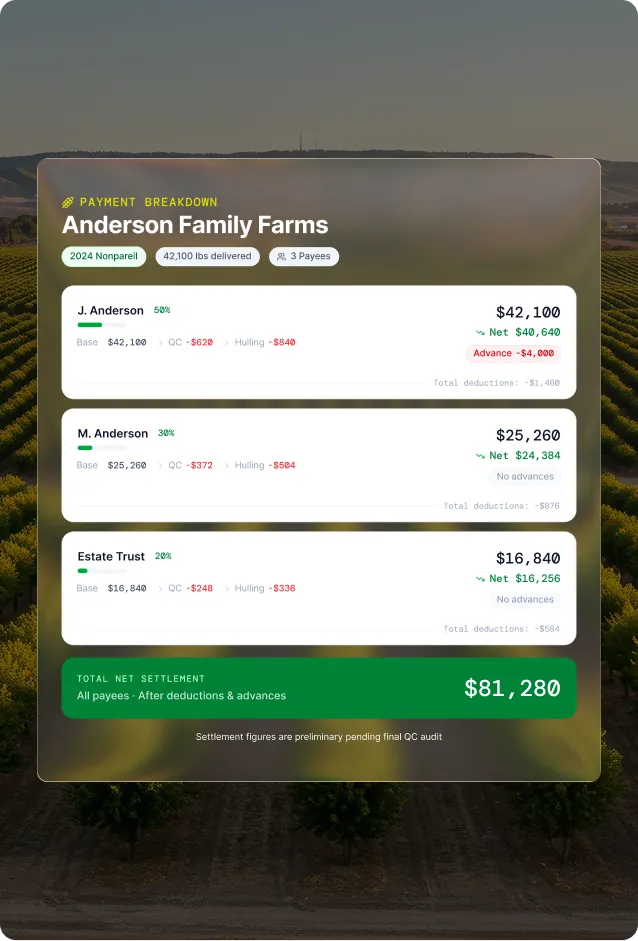
Define how weight, fee, and QC adjustment amounts are distributed across payees on each contract. A contract with a landowner, a farm operator, and a trust can have each payee’s share set as a percentage — the system applies the split to every payment automatically.
Create payment records for each grower contract and run the full payment calculation — base weight payment, QC adjustments, charges, and advances — from a single screen. Review the breakdown before confirming or deferring the payment.
After the total payment is calculated, the system applies the defined payee distribution percentages and splits the amount automatically across all payees on the contract. Each payee receives their correct share of the base payment, fees, and QC adjustments.
Record advances issued to individual payees manually against the contract. When a payment is processed, the system suggests which advances to recoup and by how much — visible as a line item on the payment before it is confirmed.
Record hulling charges, shelling charges, and any other deductions manually against individual payees. Charges appear as line items in the payment calculation and are split according to the payee’s distribution percentage.
Alongside advance recoupment, the system also suggests outstanding other charges to recoup at payment time. The suggestions are editable before confirmation — giving the payments team full control over what is deducted from each payment run.
View the outstanding balance of advances and other charges for each payee on any contract at any time. The balance list updates as payments are processed and recoupments are applied, giving an accurate picture of what each payee still owes.
Before a payment is finalized, the payments team can review the full calculation, confirm it for processing, or defer it to a later date. Deferred payments remain in the queue with their calculation intact so nothing needs to be rebuilt when they are resumed.
Confirmed payments generate ACH or check payment files per payee through Microsoft Dynamics 365. Payment generation is per payee — each payee on a contract receives their own payment record in the correct format for their banking details.
Configure and maintain the QC tables that drive price adjustments at payment time. Tables define the deduction or bonus applied per quality attribute — moisture level, foreign material percentage, defect rates — and update across all associated payments automatically when a table value changes.
When a payment is created, the system applies the relevant QC adjustment tables to the grower’s delivered product and calculates the total deduction or bonus automatically. The adjustment appears as a named line item on the payment so growers and handlers can see exactly what drove the figure.
Quality-based deductions and bonuses are distributed across payees in the same proportions as the base payment. A moisture deduction on a contract with three payees is split automatically — no separate calculation required for each payee share.
View all inbound manifests and USDA certificates for a grower and contract from a single screen in the Growers Portal. Receiving data flows in from AgriWMS in real time — no separate lookup in the warehouse system required.
Generate a settlement report for any payee showing the full breakdown of their payment — gross weight payment, QC adjustments, charges, advances recouped, and net amount paid. The report is printable and available for any completed or historical payment run.
Create and maintain master records for each grower in the system. The grower record is the anchor that ties together contracts, receiving manifests, QC results, and payments — shared across AgriWMS, the Quality App, and the Sales App through Microsoft Dynamics 365.
Create master records for each payee associated with a grower contract — individual landowners, farm operators, trusts, or co-owners. Each payee record is independent and can be linked to multiple grower contracts across different crop years.
Update payee contact information and banking details from a single screen. Banking details feed directly into the ACH and check payment generation process in Microsoft Dynamics 365 — changes take effect on the next payment run without any manual configuration in the ERP.


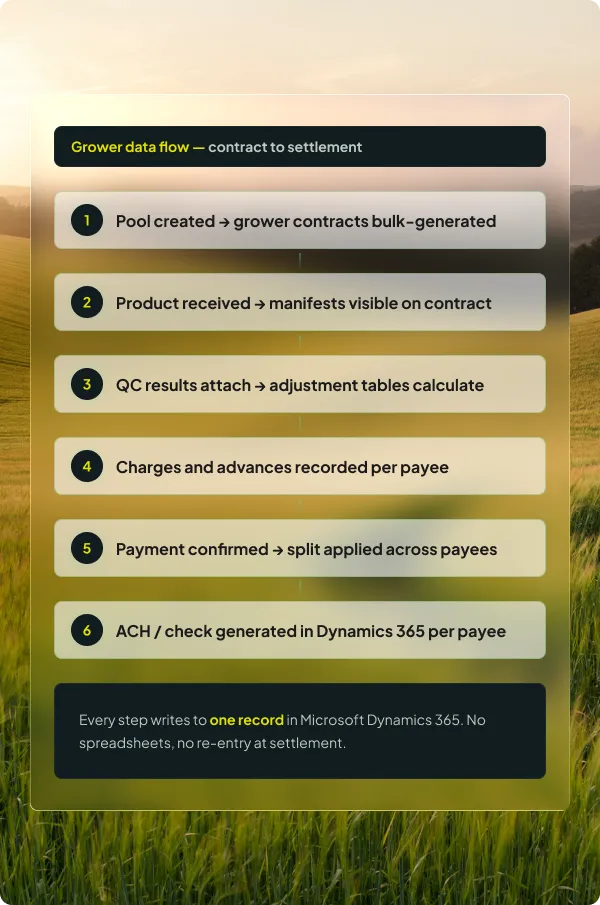
The Growers Portal handles the full payment lifecycle. Each step is connected, so changes at one stage — a revised QC table, a new advance — flow through to the final payment automatically.
Inbound manifests and USDA certificates from AgriWMS are visible on the grower contract. Delivered weight is the basis for the payment calculation.
The payment system applies the QC adjustment tables to the delivered product. Deductions and bonuses are calculated per quality attribute and displayed as named line items.
Hulling, shelling, and other charges are entered against each payee. Any outstanding advance balances are flagged for recoupment with a suggested amount.
The total net payment is split across all payees on the contract using the defined distribution percentages. Each payee’s gross, adjustments, charges, and net are calculated automatically.
The payments team reviews the full calculation before confirming. Payments can be deferred if something needs resolution — the calculation is preserved and ready to resume.
Confirmed payments trigger ACH or check generation in Microsoft Dynamics 365 per payee, using the banking details on the payee master record.
The Growers Portal runs on Microsoft Dynamics 365. Grower and payee records created here are the same records referenced by AgriWMS at receiving, the Quality App for QC results, and the Sales App for contract linking — no duplication, no re-entry.
The grower master record in the Portal is the same record used in AgriWMS, Quality App, and Sales App. Changes made here reflect everywhere immediately.
Payment generation is handled natively in Dynamics 365 — no third-party payment tool required. Payee banking details from the Portal feed directly into the payment run.
Grower contracts, payee banking details, and settlement data sit on Microsoft’s cloud infrastructure with role-based access and a full audit trail.
Grower records, contracts, and pool pricing set up in the Portal flow through every other app in the suite — from receiving in AgriWMS to settlement reporting at the end of the season.
Book a walkthrough and we will map your pre-cleaning, production, and treatment workflow to the AgriERP Production App — on Microsoft Dynamics 365.
The questions QC managers and operations leads ask before committing to a walkthrough — answered directly.

You create a pool for the crop year, define the variety prices and terms within it, and then run a bulk contract creation that generates individual grower contracts for every grower assigned to the pool. Each contract inherits the pool structure but can be adjusted individually before being issued. If you ran a similar pool last season, you can copy it and update only what changed — prices, growers, or terms — rather than rebuilding from scratch.
QC adjustment profiles define the deduction or bonus per quality attribute — for example, a price deduction per percentage point of moisture above a threshold. When a payment is created, the system pulls the QC results recorded in the Quality App for that grower’s delivered product and applies the adjustment tables automatically. The deduction or bonus appears as a named line item on the payment. If a QC table value changes, the system recalculates affected payments without manual intervention.
Yes. Each grower contract supports multiple payees with independently defined distribution percentages for weight payment, fees, and QC adjustments. A contract might have a landowner at 50%, a farm operator at 30%, and a trust at 20% — each receiving their correct share of every component of the payment automatically. Percentages can differ across payment types if the contract requires it.
Advances are recorded manually against individual payees throughout the season. When a payment is created, the system checks each payee’s outstanding advance balance and suggests a recoupment amount — which can be the full balance or a partial recoupment depending on your policy. The suggestion is editable before the payment is confirmed. Once confirmed, the advance balance reduces by the recouped amount and the payee’s current balance view updates immediately.
Once a payment is confirmed in the Growers Portal, payment generation happens through Microsoft Dynamics 365 — not a third-party tool. Each payee on the contract gets their own payment in the format matching their banking details. ACH payments use the account and routing numbers on the payee master record. Check payments generate a check record in Dynamics 365. Updates to banking details on the payee record take effect on the next payment run automatically.
Yes. The review step before confirmation includes a defer option. A deferred payment stays in the payments queue with its full calculation intact — QC adjustments, charges, payee splits, and advance recoupments — so nothing needs to be rebuilt when the dispute is resolved. When you are ready, you resume the payment, make any adjustments needed, and confirm.