The ERP Solution for the Year” 2025 in Agtech Breakthrough Awards 2025
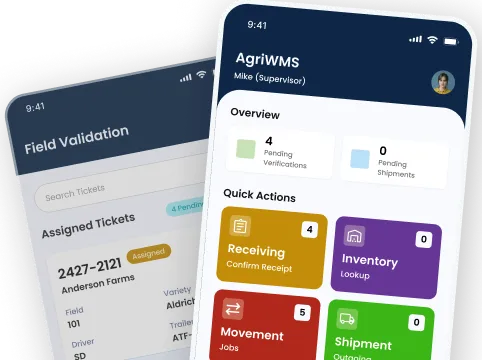
AgriWMS handles receiving, inventory, movement, and shipment for almond handlers — on the warehouse floor and in the back office — all connected to a single record on Microsoft Dynamics 365.
Built on


Most handlers track inventory across whiteboards, paper manifests, and disconnected tools. When something goes wrong — a missing bin, a wrong lot shipped — nobody can trace it back.
Bin counts are reconciled at week-end, if at all. By the time something is missing, it has already been shipped on the wrong contract.
Field ticket data never reaches the shipping desk in a usable form. Tracing a lot back to the grower means digging through paper manifests.
Receiving is entered twice — once on the floor, once into the accounting system. The lag means finance is always working from stale data.
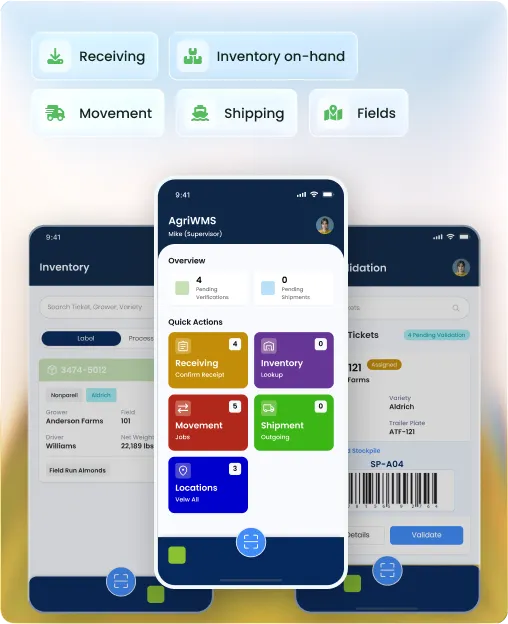
AgriWMS covers every warehouse workflow from the moment a trailer arrives to the moment a shipment leaves — with mobile tools for the floor and real-time visibility in the office.
Create field tickets by hand or trigger them automatically from scale integration. Both produce a structured, traceable record tied to a grower and lot.
Capture gross and tare weights directly from connected scales. No manual entry, no transcription errors between the weight station and the system.
Assign incoming loads to a stockpile on receipt and reassign to a different location without losing the original lot history.
Verify stockpile contents against expected loads before completing receiving. Discrepancies are flagged, not silently accepted.
Handle mixed-variety loads and split trailers correctly. Each variety is tracked separately and recorded against the right grower and field.
When receiving is complete, the record posts directly to Microsoft Dynamics 365. No double entry, no reconciliation step at week-end.
Receive empty bins back from growers and track the balance separately from product inventory. Know exactly how many empties are outstanding at any time.
Process rejected product coming back from a handler. Received into inventory with a separate lot history, not merged with incoming field product.
Filter inventory by product type — field run almonds, cleaned almonds, kernels, and in-shells — with live counts across all warehouse locations.
See inventory by location type: stockpiles for raw almonds, tanks for hulls and shells, and staging areas for product ready to ship. Filterable and real-time.
Quality attributes from the Quality App attach directly to each lot's inventory record. See moisture, foreign material, and defect data alongside the inventory count.
Run on-hand validation checks to confirm system inventory matches physical counts. Discrepancies surface as exceptions, not silent errors in your ERP.
Assign tags to bulk inventory in a single operation rather than one bin at a time. Speeds up lot tagging at receiving and after processing.
Bring in inventory records from external sources — third-party storage, external handlers — and manage them within the same system as your own stock.
Plan and schedule product movement from a stockpile to the pre-cleaning stage. Movements are recorded and visible across the operation before product moves.
Move product from a stockpile into a pre-clean staging area. The staging record updates automatically so production knows what is queued and available.
Lock a lot or stockpile from movement during fumigation. Blocked inventory cannot be accidentally moved or shipped until the block is cleared by an authorized user.
Move bins or trailers between any two warehouse locations with a single transaction. The system records origin, destination, lot, and timestamp with no paperwork.
Move a single bin or an entire bulk lot in one action. Both modes write to the same inventory record, so counts stay accurate regardless of how the movement was triggered.
See and act on inventory layout directly from a mobile device on the warehouse floor. Reorganize, reassign, or confirm locations without returning to a desktop terminal.
Process outbound shipments at the bin level or the trailer level. Both post to the same sales contract record in Microsoft Dynamics 365.
Ship hulls and shells as a distinct product type with their own lot records and weight documentation, separate from kernel or in-shell shipments, integrated with your ERP.
Verify shipment contents before the truck leaves. Verification can be done at a desktop terminal or on a mobile device at the dock — the same data either way.
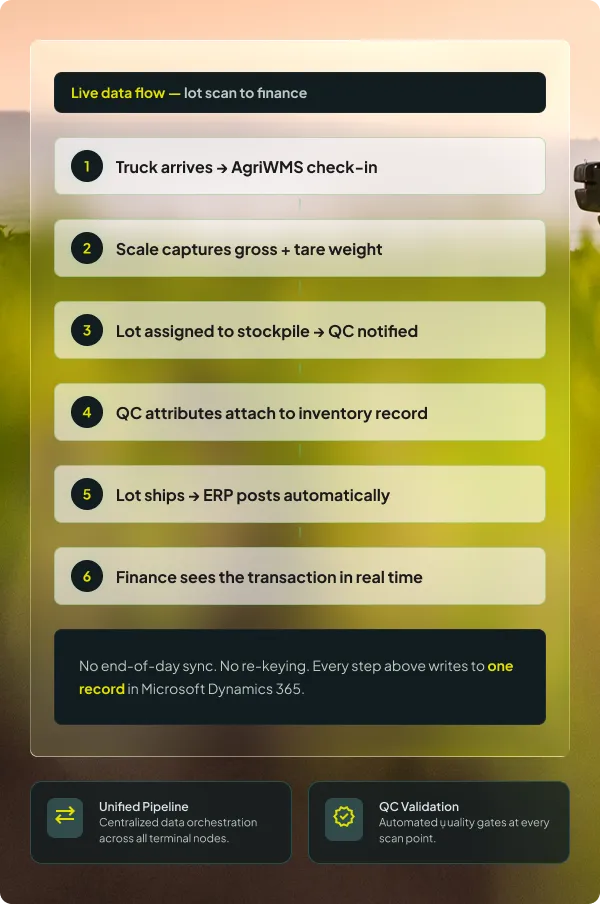
Completed shipments post directly to Microsoft Dynamics 365. Inventory deducts, the sales contract updates, and finance sees the movement in real time.
Reverse a shipment when needed — cancelled loads, wrong lots — without corrupting the original record. The reversal creates its own transaction trail in the ERP.
Manage live-load and drop-trailer shipments as distinct workflows. Each type has its own process flow and documentation, tracked under the same shipment record.
Record truck arrivals and departures through a structured check-in and check-out process. Every visit is timestamped and tied to the loads or shipments it carried.
Link a truck to a specific outbound shipment on check-in and de-link it when plans change. The shipment record stays clean regardless of how many trucks were swapped.
Sync production trailers to the WMS, capture trailer weights, and void individual trailers when needed — connected to the production workflow in real time.
Weigh multiple production trailers in sequence and record net weights per trailer. Weights feed directly into production yield calculations without manual re-entry.
Track every bin from receipt through to return. Know how many bins each grower has outstanding, filtered by crop year, at any point in the season.
All WMS screens filter by crop year. Switch between seasons without losing your place — inventory, bin balances, and shipment history stay organized by year.
Generate handler bin records and print bin labels directly from the WMS. Labels include lot, variety, grower, and location data — scannable for mobile verification.
Generate weight certificates and outbound shipment documents from within the WMS. The system pulls live lot and weight data into the template automatically.
Print or reprint lot labels, bin tags, and shipment documents from any connected printer. Printer configuration is managed centrally so floor staff do not waste time routing jobs.
Issue and reclaim empty bins with a dedicated workflow separate from product inventory. Know exactly how many empties are out with growers and how many are back on-site.


AgriWMS does not sync to Microsoft Dynamics 365 at the end of the day — it runs on it. Every scan, every weight, every lot update writes to the same record that finance, quality, and sales are reading right now.
Your operational and financial data sit on Microsoft's cloud infrastructure, not a third-party hosting environment.
Start on Business Central and grow into Dynamics 365 Finance and Operations as your volume and complexity increase.
Every WMS screen works on the floor on a tablet or phone, and in the office on a desktop. The same data, the same source of truth.
Every app in the suite shares the same data record. What happens in the warehouse is immediately visible to quality, production, and sales — because they are all running on the same platform.
Book a walkthrough and we will map your receiving, inventory, and shipment workflow to AgriWMS — on Microsoft Dynamics 365.
The questions handlers ask before they commit to a walkthrough — answered directly.

AgriWMS integrates with connected scales to capture gross and tare weights directly into the receiving workflow — no re-entry required. During the implementation scoping call, we confirm your scale hardware and configure the integration before go-live. Bring your specific scale vendor to the walkthrough and we will confirm compatibility.
You can start with AgriWMS on its own. The app is built on Microsoft Dynamics 365 Business Central, so if you add other AgriERP apps later — Quality, Production, or Sales — they plug into the same data model you already have. There is no migration or re-implementation involved in adding apps.
When a lot or stockpile is flagged for fumigation, the system applies a movement lock that prevents any movement or shipment transaction from completing against that inventory. The block is visible to warehouse staff on mobile and to office staff on desktop. Only an authorized user can clear the block, and the clearance is timestamped in the lot history.
When a receiving transaction or a shipment is completed in AgriWMS, the record posts directly to Microsoft Dynamics 365 — updating inventory ledgers, grower accounts, and the relevant purchase or sales contract. There is no manual sync step and no batch file to run at end of day. Finance sees the movement the moment it is confirmed on the floor.
The mobile version is built for warehouse floor use, not stripped down for it. Receiving verification, USDA sample management, bulk loading, inventory organizer view, and shipment verification all have dedicated mobile screens. They are not compressed desktop views — they are interfaces designed for handheld use in a working warehouse environment.
Crop year is a first-class filter across AgriWMS. Inventory views, bin balances, and shipment records all filter by crop year, and you can switch between years at the top of any screen. If your operation runs two crop years concurrently during the transition period, the system keeps them separated with no manual tagging or workarounds required.