Data Analytics Solution of the Year” 2026 in Agtech Breakthrough Awards 2026


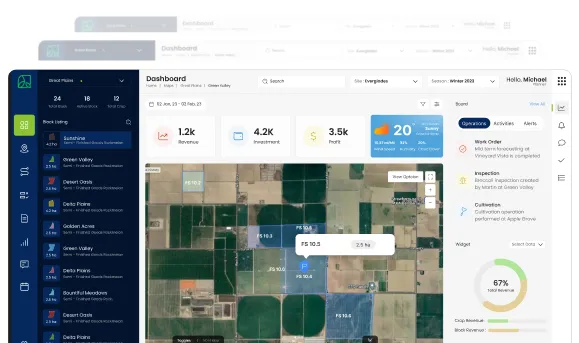
If the Core ERP Layer is the engine room, the Farm Web App is the bridge of the ship. It is the screen your operations team, your farm managers, and your owners look at every morning to know what is going on, every afternoon to see what changed, and every evening to plan the day ahead.
This is the part of AgriERP your office team lives in. It is not a stripped-down dashboard, and it is not a generic ERP screen. It is built around the two questions that matter most to anyone running a farm: what should we be doing, and how is it going?
What this section covers
The Farm Web App is built around two complementary capabilities:
- Planning: deciding what should happen, when, where, by whom, and with what.
- Monitoring: seeing in real time what is actually happening, what is going well, and what needs attention.
Together they form a continuous loop. Plans drive activity in the field. Activity flows back into the system. The system shows you what is on track and what is not, which feeds the next plan. The Farm Web App is where that loop is run.
1. Planning
In one line
Plan the season, the month, the week, and the day from one place, with the inputs, labor, equipment, and budget you actually have.
Why planning is hard on a farm
Farms run on plans, but most plans live in scattered places. The agronomist has a spray program in a notebook. The harvest schedule is on a whiteboard in the packhouse. The labor roster is in someone’s WhatsApp. The procurement calendar is in the finance director’s email. By the time everyone is on the same page, the page has changed.
The Farm Web App pulls every kind of plan into one place, so each one stays connected to the others. When the harvest schedule shifts, the labor roster knows. When the spray program changes, procurement knows. When the budget tightens, the season plan adjusts.
What you can plan
The Farm Web App supports five layers of planning, from the long view down to today’s work order.
| Layer | What it covers |
|---|---|
| Season planning | Forecast the season using historical sales, signed contracts, and demand projections. Decide what to grow, where, in what volume, and to what specification, before the first seed is planted. |
| Crop and block planning | Map your farms, blocks, sub-blocks, and varieties. Set the agronomic plan for each: irrigation schedule, fertilizer program, pest and disease control, growth-stage milestones. |
| Resource planning | Plan labor, equipment, and inputs together. See if you have the crew, the tractors, and the fertilizer to actually deliver the plan, before the day arrives. |
| Work order planning | Turn the plan into specific, assignable tasks. Spray Block 14 on Tuesday morning. Irrigate Block 22 overnight. Scout Block 7 on Friday. Each work order has a who, a what, a where, and a when. |
| Budget and cost planning | Set the financial plan alongside the operational one. Expected input cost per block. Expected labor cost per activity. Expected revenue per crop. Watch actuals move against the plan as the season runs. |
How planning works in practice
A typical planning cycle in the Farm Web App looks like this:
- Step 1: Set the season plan: the operations director and agronomist decide what each farm and each block will grow this season, based on contracts, market signals, and historical performance.
- Step 2: Build the crop programs: for each crop and block, the system records the schedule of activities, irrigations, sprays, fertilizations, scouting visits, and harvest windows.
- Step 3, Check resources: the system checks whether the inputs, labor, and equipment needed to deliver the plan are available, and flags conflicts or shortages.
- Step 4: Generate work orders: the planned activities are turned into specific work orders, assigned to crews and supervisors, with target dates.
- Step 5: Push to the field: the work orders flow to the mobile app, where field crews see their day’s tasks and start logging activity against them.
Key planning capabilities at a glance
| Capability | What it does |
|---|---|
| Visual season planner | Drag-and-drop calendar of crops, blocks, and activities across the year. See conflicts, gaps, and the full season at a glance. |
| Block and crop master | Every farm, block, and sub-block as a structured record, with area, soil type, variety, planting date, and history. |
| Activity templates | Reusable plans for common crop programs, so you do not rebuild the spray schedule for tomatoes from scratch every year. |
| Resource availability check | Live view of labor, equipment, and input availability against the plan, with conflict warnings. |
| Work order generator | Turn agronomic plans and harvest schedules into assigned, scheduled work orders in one click. |
| Budget linkage | Every plan is connected to the budget. Move an activity, and the projected cost moves with it. |
| Approval workflows | Plans, budgets, and work orders can require sign-off, so nothing major moves without the right person agreeing to it. |
| How AgriERP shapes planning for agriculture. A standard ERP planner thinks in terms of products, work centers, and shifts. Useful for a factory, useless for a farm. AgriERP shapes planning around the way agriculture actually works.Plans are built against blocks and crops, not generic line items. Schedules respect growth stages, weather windows, and re-entry intervals. Resource checks understand that the same crew cannot harvest two blocks at once. Budgets understand that fertilizer cost belongs to a crop on a block in a season, not just to a general expense bucket. The result is a plan you can actually execute, not a plan the field has to argue with. |
2. Monitoring
| In one lineSee what is actually happening, the moment it happens, across every farm, every block, every crew, and every dollar. |
Why monitoring matters
Plans are written in advance. The day is not. Weather changes, equipment breaks, crews are short, buyers shift orders, and reality moves around the plan. Without a way to see what is actually happening, leaders are forced to manage by phone calls, end-of-day reports, and the gut feel of supervisors. Decisions arrive late, and they cost money.
Monitoring in the Farm Web App means leaders see the operation as it runs, not as it was reported the night before. It is the difference between steering the business and reacting to it.
What you can monitor
The Farm Web App gives you four kinds of visibility, each answering a different kind of question.
| Type | What it shows |
|---|---|
| Operational monitoring | What is happening right now in the field? Active work orders, crew positions on the map, equipment status, irrigation in progress, and harvest tonnage flowing into the packhouse. |
| Performance monitoring | How is it going? Productivity by crew, yield by block, work order completion rate, equipment uptime, and harvest pace against target. |
| Financial monitoring | What it is costing and what it is earning. Actual cost vs. budget by crop and block, input usage vs. plan, accounts receivable position, and season profitability so far. |
| Compliance and quality monitoring | Whether the operation is staying within the rules. Spray records, re-entry intervals, certification status, quality test results, and audit trails. |
How monitoring works in practice
Monitoring in the Farm Web App is built around three core experiences:
Dashboards
Each role gets a dashboard shaped for what they care about. The owner sees season profitability, yield by crop, and budget status. The operations manager sees today’s work orders, crew positions, and equipment status. The harvest coordinator sees tonnage by block and trucks dispatched. The dashboards update in real time, so what you see is what is happening.
The map view
A live map of the farm with every block, every active work order, every crew position, and every piece of equipment plotted on it. Click a block to see what is planted, what was last done on it, and what is scheduled. Click a crew to see what they are working on. The map turns the abstract plan into something you can actually see.
Reports and exception alerts
Standard reports cover the day, the week, the month, the season, and the year, by farm, crop, block, crew, and crop. On top of that, the system raises alerts when something falls outside expectations: a work order is overdue, a budget is being exceeded, a quality result is out of spec, an irrigation cycle was missed. Leaders are told when something needs attention, instead of having to look for it.
Key monitoring capabilities at a glance
| Capability | What it does |
|---|---|
| Live operational dashboard | Real-time view of work in progress, broken down by farm, block, crew, and activity. |
| Map view of the farm | Geographic view of every block, every active job, every crew, and every piece of equipment. |
| Work order tracker | Status, progress, and completion of every work order, by crew and by block. |
| Yield and harvest tracker | Tonnage and quality flowing in from the field, by block and by crop, in real time. |
| Resource utilization view | How labor, equipment, and inputs are actually being used against the plan. |
| Cost and budget monitor | Live view of actual cost vs. budget by crop, block, and season. |
| Exception alerts | Automatic notifications when something falls outside the plan: overdue work, budget overruns, quality failures, missed irrigations. |
| Audit and compliance log | Every activity recorded with who did it, when, where, and against which plan, ready for buyers, auditors, and regulators. |
| How AgriERP shapes monitoring for agricultureMost enterprise dashboards show numbers. They tell you tonnage is up or cost is over, but they do not tell you why. AgriERP’s monitoring is connected to the real-world units of agriculture, blocks, crews, varieties, harvest batches, so every number leads back to a place, a team, and an activity. If yield on Block 14 is below plan, you can drill into the block and see the spray program, the irrigation history, the labor that worked it, the inputs that went on, and the weather it saw. Numbers stop being scoreboards and start being explanations. |
3. Planning and monitoring, working as one loop
The Farm Web App is not two separate features stacked together. Planning and monitoring are designed to feed each other, all season long.
- Plans become work: every plan in the system can be turned into work orders, with one click.
- Work becomes data: every work order completed in the field flows back into the system as activity, cost, yield, and quality.
- Data becomes insight: the activity feeds the dashboards, the alerts, and the variance reports that show what is going well and what is not.
- Insight becomes the next plan: what you learned from this week, this month, and last season shapes the plan for the next one.
What this changes day to day
- For owners and growers: you stop running the business from end-of-day phone calls. You see the season as it unfolds.
- For operations and farm managers: you stop holding the plan in your head and chasing updates. The plan is in the system, and the updates come to you.
- For agronomists: your spray and irrigation programs stop being a notebook. They become a living plan that the field actually follows, with a record at the end.
- For finance: every activity in the field is already a financial event by the time you see it, with the right cost on the right crop on the right block.
In summary
The Farm Web App is where the agribusiness is run. Planning gives the operation a clear direction. Monitoring shows whether reality is matching that direction. Together they replace the patchwork of spreadsheets, whiteboards, notebooks, and phone trees with one connected, real-time view of the farm.
The next section moves from the office to the field, into the Mobile App, where the work plans created in the Farm Web App are actually delivered.