Data Analytics Solution of the Year” 2026 in Agtech Breakthrough Awards 2026


AgriERP is built around a simple promise: end-to-end coverage. From the first season plan to the final invoice, every part of the agribusiness lives in one system. The capabilities below are organized into four layers, Farm, Business / ERP, People & Equipment, and Intelligence, to show how the whole picture comes together.
Layer 1 — Farm Operations
This is the heart of the system: everything that happens on the land, from planning the season to harvesting the crop.
- Season planning. Forecast the season using historical sales, signed contracts, and demand projections, so you grow the right volume of the right crops.
- Crop management. Define farms, blocks, sub-blocks, and varieties. Plan irrigation, fertilizer, and pest control activities for each one.
- Work order management. Create, assign, and track every task, spraying, irrigation, scouting, harvest, by block, by crew, by date.
- Production management. Track harvest into packhouse, chemical and input usage, work-in-progress, and production orders, end to end.
- Real-time farm monitoring. Live visibility, by block, by activity, by crew, without phone calls or paper logs.
Layer 2 — Business and ERP Backbone
Underneath the farm, AgriERP carries the full enterprise toolkit you would expect from Microsoft Dynamics 365. This is what turns farm activity into clean financial truth.
- Financial management. General Ledger, Accounts Payable, Accounts Receivable, budgeting, tax, and real-time bank reconciliation.
- Crop-level costing and profitability. See the true cost, and the true margin, of each crop, each block, each season.
- Procurement and consumption planning. Manage vendors, raise purchase orders, and compare what you forecast you would use against what you actually used.
- Inventory and warehouse management. Raw materials, work-in-progress, finished goods. Multiple locations, bins, capacity, and quality control, fully traceable.
- Sales and contracting. Sales orders, contracts, fulfillment tracking, invoicing, and disputes, connected to the harvest that supplies them.
- Logistics and outbound transport. Dispatch, route planning, load building, and shipment tracking from gate to customer.
- Grower management. Onboarding, contract creation and approvals, settlement processing, and payment reports for the growers you work with.
Layer 3 — People, Equipment, and Land
A farm runs on its workforce, its machinery, and its land. AgriERP treats all three as first-class assets.
- Land and buildings. Track farms, warehouses, and storage units as structured assets with full history.
- HR, labor, and payroll. Employee records, attendance, clock in/out, payroll, and farm-specific labor tracking.
- Equipment and asset management. Field-level equipment tracking, breakdowns, maintenance schedules, depreciation, and full lifecycle.
- Resource planning. Plan labor, machinery, and inputs together, so you don’t end up with a crew and no tractor, or a tractor and no fuel.
Layer 4 — Intelligence and Connectivity
This is the layer that turns AgriERP from a record-keeping system into a decision-making system.
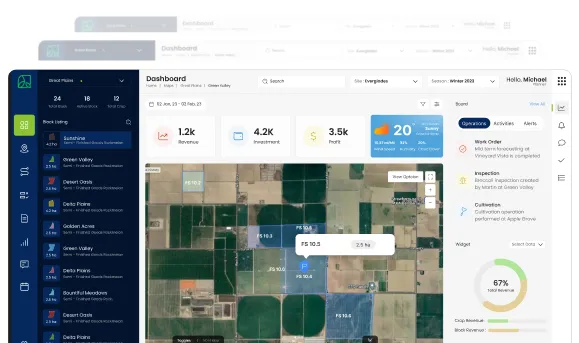
- Operational dashboards. Yield, productivity, work order status, equipment uptime, labor utilization, live, not lagging.
- Financial reports. Profitability analysis, cost breakdowns, budget vs. actual, all linked back to operations.
- AI Companion. An always-on assistant inside AgriERP that can pull data, draft reports, automate routine ERP actions, forecast demand, and suggest next steps.
- Mobile and web access. Office team uses the web app. Field crews use the mobile app. Growers get their own portal. Same data underneath.
- Integrations. Connect IoT sensors, third-party agronomy tools, and other systems so data flows in and out automatically.
- Cloud and security. Hosted on Microsoft Azure with enterprise-grade security, role-based access, and global availability.
End-to-end coverage at a glance
Reading the layers in order shows how the system actually flows in real life:
| Procurement raises a purchase order to the supplier and receives the fertilizer into the warehouse. Inventory records the new stock, by batch, by location. Operations creates a work order to apply it to Block 14, assigned to a crew. The crew opens the mobile app, clocks in, and logs the application, quantity, time, GPS. Inventory automatically deducts the used fertilizer. Costing applies the cost to that crop, on that block, for that season. Finance sees it in the Accounts Payable, the General Ledger, and the budget actuals. Leadership sees it on the dashboard as part of “input cost per acre” trending up or down. |
What this delivers, in numbers
Customers running AgriERP typically see meaningful, measurable improvements across three areas:
| ~40%Better resource utilizationLabor, machinery, and inputs are used at the right time, in the right quantity. | ~35%Operational efficiency boostCentralized data and AI-assisted automation remove repetitive work. | ~20%Waste and cost reduction: Less guesswork on seeds, fertilizers, water, and other inputs. |
In summary
AgriERP brings together everything an agribusiness needs to run, the field, the office, the books, the people, and the data, on a single, AI-ready platform built on Microsoft Dynamics 365 and hosted on Microsoft Azure.
The rest of this document walks through each piece in detail: how the platform is built, what each module does, how it serves growers and field users, how reporting and AI work, how integrations are handled, and how implementation runs from day one to go-live.