The ERP Solution for the Year” 2025 in Agtech Breakthrough Awards 2025

AgriERP App Suite — Step 4: Check

Quality that closes every gap.

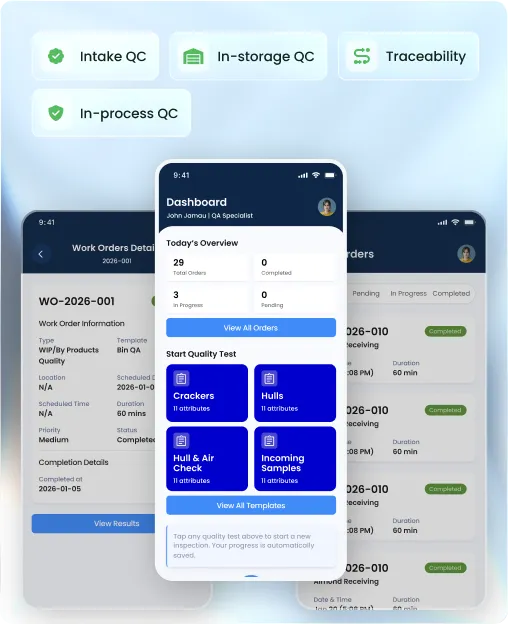
The Quality App gives almond handlers a single system for intake QC, in-storage QC, in-process QC, and traceability — with configurable templates, formula-driven calculations, and automatic lot-level records on Microsoft Dynamics 365.

Intake, in-storage & in-process QC
Microsoft Dynamics 365
Formula builder with BODMAS
Mobile & tablet

Built on

Trusted by growers and processors

The problem with most QC tools

Quality data collected on paper never reaches the lot.

Most handlers run QC on paper forms or spreadsheets that never connect to inventory. By the time a quality issue surfaces, the lot has already moved — and nobody can trace it back.

Forms that don't connect to anything

Paper QC sheets and standalone spreadsheets mean quality data never attaches to the lot. Traceability requires manual digging across multiple files.

No enforcement on critical limits

Without range validation and blocking rules, out-of-spec results get recorded and ignored. Lots move forward when they should be flagged or held.

QC templates rebuilt from scratch every season

Every crop year starts with re-creating inspection forms by hand. There is no way to clone, version, or manage templates across teams and locations.

Full feature set

Every QC workflow, one configurable system.

From attribute setup to lab test recording and auto-process quality, the Quality App handles the full inspection lifecycle — on mobile and desktop, tied to the lot at every step.

Create, Update, Clone, and Delete Attributes

Build your full library of quality attributes from scratch or clone existing ones. Update definitions at any time, or delete attributes that are no longer in use.

Attribute Types — Dropdown, Units, and System Values

Configure attributes as manual dropdowns, unit-based measurements, or system-fetched values. Each type renders the right input field automatically during inspection.

Formula Builder with BODMAS and Functions

Build calculated attributes using standard operators (+, −, ×, ÷, brackets) with BODMAS precedence enforced. Reference other attributes in formulas, and use functions including SUM, IF, and COUNT for complex calculations.

Min / Max Validation with Warning and Blocking

Set compliance rules on any attribute. Out-of-range values trigger a warning to alert the inspector, or a block that prevents the order from completing until the value is corrected.

Enable / Disable Attributes

Deactivate attributes that are not needed for a current crop year without deleting them. Re-enable at any time — history and configuration are preserved.

Search, Filter, Sort — Grid and Card View

Find any attribute instantly with search, filter by type or status, and sort by any column. Switch between grid view for bulk management and card view for a visual overview.

Create, Update, Clone, and Delete Template Attributes

Build metadata fields that capture the context of an inspection — grower, lot, location, run number. Clone existing attributes to reuse configuration across templates.

Dropdown Sources — Manual, Master Data, and Transactional Data

Populate dropdown attributes from manually entered values, master data tables, or live transactional data. Reference tables update automatically as new records are added to the ERP.

Date and Time Attributes with Smart Defaults

Add date and time fields to templates with optional defaults set to the current date or current time at the moment of inspection. Eliminates manual entry for standard timestamp fields.

System-Fetched Attributes via Lookup

Configure attributes that pull their value automatically from another field — for example, deriving a grower field value from a run number. Reduces data entry and eliminates transcription errors.

Default Value Configuration for Dropdowns

Set a default selected value on any dropdown template attribute. The field pre-populates on order creation and can be overridden by the inspector when needed.

Enable / Disable, Search, Filter, and Sort

Deactivate template attributes without deleting them, and find any attribute instantly. Grid and card view available for both bulk management and visual browsing.

Create, Update, Clone, and Delete Templates

Build inspection templates for every QC scenario — intake receiving, in-storage checks, in-process quality, lab tests. Clone a template to create a variant without rebuilding from scratch.

Assign Template Attributes and Quality Attributes

Attach metadata fields (template attributes) and inspection fields (quality attributes) to any template. Each section is configured and arranged independently.

Attribute Sequencing, Arrangement, and Mandatory Flags

Control the order attributes appear on the inspection form and mark individual fields as mandatory or optional. Mandatory fields block order completion until filled.

Favourite Templates for Quick Access

Mark frequently used templates as favourites and access them at the top of the list on quality order creation. Add, remove, and retrieve favourite templates from any device.

Enable / Disable Templates

Deactivate templates for previous crop years or inactive QC processes without removing them from the system. History is retained and the template can be reactivated at any time.

Search, Filter, Sort — Grid and Card View

Find any template instantly. Filter by template type, sort by date or name, and choose between grid and card layout to suit how your QC team works.

Create Quality Orders via Template Selection

Start a new quality order by selecting a template. The form renders automatically with the right metadata fields, inspection attributes, and validation rules already configured.

Edit Open and Completed Orders

Update in-progress quality orders as inspection continues. Completed orders can also be edited when corrections are needed — all changes are logged against the original record.

Status Management and Validation on Completion

Orders move through a defined status workflow. On completion, mandatory fields are checked and range validations fire — blocking completion if any critical value is out of spec.

Formula Auto-Calculation During Inspection

Calculated attributes update automatically as inspection values are entered. Inspectors see computed results — yield percentages, defect rates, derived scores — in real time on the form.

Export to Excel with Full Attribute Data

Export any quality order list to Excel, including all inspection attributes and their recorded values. Useful for reporting, audit preparation, and sharing results with buyers or processors.

Search, Filter, Sort — Grid and Card View with Attributes on Grid

Find any quality order instantly. Attribute columns appear directly in the grid view so teams can compare inspection results across multiple orders without opening each one.

Auto Process Quality

Trigger quality checks automatically as product moves through defined processing stages. Quality orders are created without manual intervention, so no inspection step gets missed during high-volume processing runs.

Lab Test Recording

Record lab test results directly against a quality order — aflatoxin, moisture, defect percentages, and custom lab attributes. Results attach to the lot record and are visible across the suite in real time.

Excel Import for Bulk Data Entry

Import quality data from Excel when results come from an external lab or a legacy system. Imported values map to the correct attributes and post to the relevant quality orders automatically.

QC Attributes Integrated with Inventory

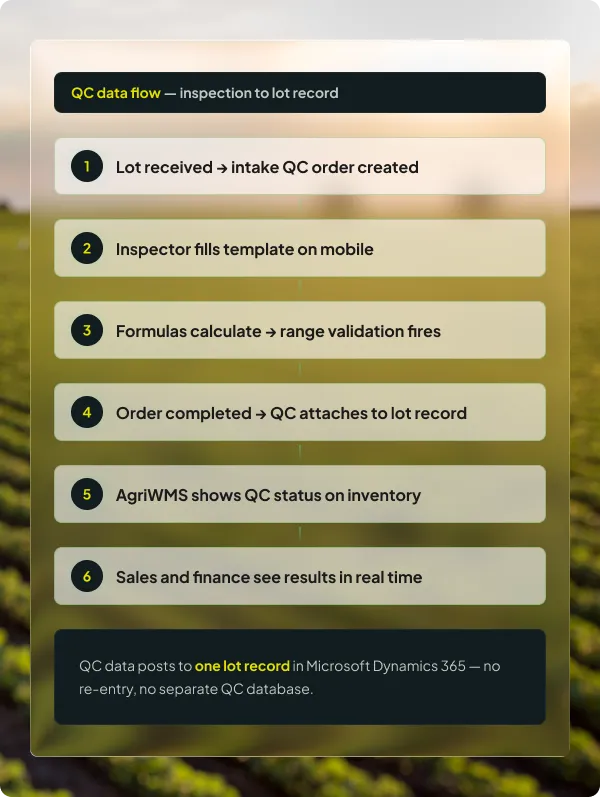
Quality results attach directly to the inventory lot record in AgriWMS. Inventory teams see QC status and attribute values alongside bin counts — no separate lookup required.

Attachments — Add and Delete

Attach photos, lab certificates, or supporting documents directly to a quality order. Attachments are stored against the order record and accessible from any device.

Dynamic Field Rendering by Attribute Type

The inspection form renders the right input control for each attribute type automatically — numeric field, dropdown, date picker, or calculated display. No fixed form layouts to maintain.

Partners & Affiliations

The platform underneath

Quality results that the rest of the operation can actually use.

Quality orders in AgriERP don't live in a separate system. Results attach to the lot in Microsoft Dynamics 365, making them visible to inventory, production, and sales the moment an inspection is completed.

QC data on the inventory record

Lot-level quality attributes appear in AgriWMS alongside bin counts. No cross-referencing between systems.

Full lot traceability

Every quality order is tied to a lot record. Trace any lot from field ticket through receiving, QC, production, and shipment in one system.

Enterprise security on Microsoft Azure

All quality records, lab results, and attachments are stored on Microsoft's cloud infrastructure with role-based access control.

The AgriERP App Suite

Quality App is one part of a connected field-to-sale system.

Every app in the suite shares the same data record. Quality results recorded here are immediately visible to inventory, production, and sales — because they all run on the same platform.

GROW

Growers Portal

OPERATE

Farm App

STORE

AgriWMS App

CHECK

Quality App

PROCESS

Production App

SELL

Sales App

See quality built into the lot, not bolted on.

Book a walkthrough and we will show you how the Quality App connects inspection data to inventory, production, and sales on Microsoft Dynamics 365.

Common questions

Before you book the demo

The questions QC managers and operations leads ask before committing to a walkthrough — answered directly.
Can we build our own inspection templates, or do they come pre-configured?

Templates are fully configurable by your team. You create the attributes, define their types and validation rules, arrange them in the order that suits your inspection workflow, and mark fields as mandatory or optional. Pre-built templates for common almond inspection types are available as a starting point and can be cloned and modified as needed.

The formula builder lets you reference any other attribute by name and combine values using standard operators with BODMAS precedence. Functions including SUM, IF, and COUNT are also supported. For example, a defect percentage attribute can be defined as a SUM of individual defect fields divided by sample weight, multiplied by 100. The result calculates automatically as the inspector fills in the source values.

Each attribute can have a min and max threshold configured. A value outside the threshold triggers either a warning — which alerts the inspector but allows the order to proceed — or a block, which prevents the order from being completed until the value is corrected or overridden by an authorized user. Warning and blocking rules are set independently per attribute.

Yes. The Excel import feature lets you bring in lab results from an external lab or a third-party testing service. Imported values map to the correct quality attributes and post against the relevant quality orders automatically. The lot record in Microsoft Dynamics 365 is updated the same way as a manually entered result.

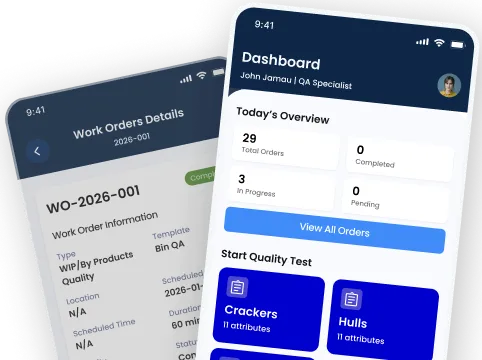
The Quality App is built for mobile and tablet use. Inspectors on the floor can create orders, fill inspection forms, view calculated results in real time, add photo attachments, and complete orders — all from a handheld device. The mobile interface is purpose-built for field use, not a compressed version of the desktop screen.

Auto Process Quality creates quality orders automatically when product reaches a defined processing stage — for example, when a run starts or a product moves from pre-cleaning to hulling. The trigger and the template used are configured during implementation. This ensures no inspection step is missed during high-volume processing without relying on manual order creation.